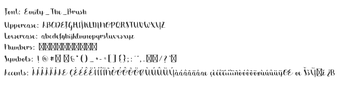
Emily The Brush by Emily The Brush is a decorative brush script for adding a handcrafted aesthetic to typography. It renders organic stroke textures across letters, numerals, and punctuation while staying legible for short text uses. The package includes common TrueType and OpenType files and a full character set for basic text composition. Suited to graphic designers, content creators, and hobbyists wanting a hand-painted look for headings and social graphics.
How much typographic variation does it offer?
The font is presented as a single decorative script rather than a family with multiple weights or wide stylistic alternates, so designers change appearance through application controls such as size, letter spacing, and color. Variation depends on the design app rather than built-in font weights or alternate glyph sets, which affects how the face behaves in branding systems that require multiple weights.
Is the font easy to install and use on a PC?
Installation follows a straightforward desktop workflow: download the package, extract the ZIP, then right-click the .ttf or .otf file and choose Install. Once installed the font appears in system font menus and in desktop editors, so adding it to projects in popular design and text applications requires no extra tooling or font managers.
Does its licence affect commercial projects?
The distribution model is oriented to personal creative use; the face is commonly listed as "Free for Personal Use" and commercial exploitation requires a separate licence from the developer. That distinction affects whether the font can be used in client work or products intended for sale, so licence clearance is a necessary step for professional projects.
Will it behave reliably across applications and print workflows?
The face enjoys broad exposure on font repositories and is usable in many desktop editors, but extended character coverage is limited: support for accented or multilingual glyphs varies by build. For multi-language or prepress jobs, confirm glyph coverage in your target file and consider converting critical text to outlines for consistent output across collaborators and print vendors.
Good choice for short, handcrafted headlines; check licence for commercial use
The font suits creators who need a hand-painted headline voice and quick visual personality for social posts, packaging mockups, or invitations. Its decorative nature makes it less appropriate for long body copy or typographic systems requiring multiple weights. Practical tip: for handoffs and print, convert key text to outlines or flattened artwork to preserve the look when recipients lack the font.
Laws concerning the use of this software vary from country to country. We do not encourage or condone the use of this program if it is in violation of these laws. Softonic may receive a referral fee if you click or buy any of the products featured here.